
MeeBhoomi AP 2026 – Check 1B, Adangal, Village Map, FMB & E-Passbook @ meebhoomi.ap.gov.in
MeeBhoomi (మీ భూమి) is the official Andhra Pradesh land records portal launched by the Government of Andhra Pradesh. The portal allows citizens to view and download their 1B, Adangal, FMB, Village Map, E-Passbook, Mutation, and other land-related details online without visiting government offices.
MeeBhoomi – మీ భూమి: Your Land, Your Information
Whether you want to verify ownership, check cultivation details, or download your electronic passbook, MeeBhoomi provides a transparent, mobile-friendly, and secure way to access your Andhra Pradesh Bhulekh records anytime, anywhere.
MeeBhoomi Portal Overview
| Feature | Details |
|---|---|
| Portal Name | MeeBhoomi Andhra Pradesh |
| Launched By | Government of Andhra Pradesh |
| Managed By | Chief Commissioner of Land Administration (CCLA), AP |
| Main Services | Adangal, 1B, FMB, Village Map, Mutation, E-Passbook |
| Official Website | meebhoomi.ap.gov.in |
What is MeeBhoomi (మీ భూమి)?
MeeBhoomi means “Your Land” in Telugu. It is a digital platform launched by the Revenue Department of Andhra Pradesh to make land ownership information accessible to every citizen.
Through meebhoomi.ap.gov.in, you can:
- Check Adangal (అడంగల్) and 1B (ROR – Record of Rights) records
- View Village Maps (గ్రామ పటం) and FMB (Field Measurement Book) details
- Download your E-Passbook
- Track Mutation and Land Disputes
- Check Aadhaar linking status of your land account
This online system brings transparency, accuracy, and efficiency to land record management across Andhra Pradesh.
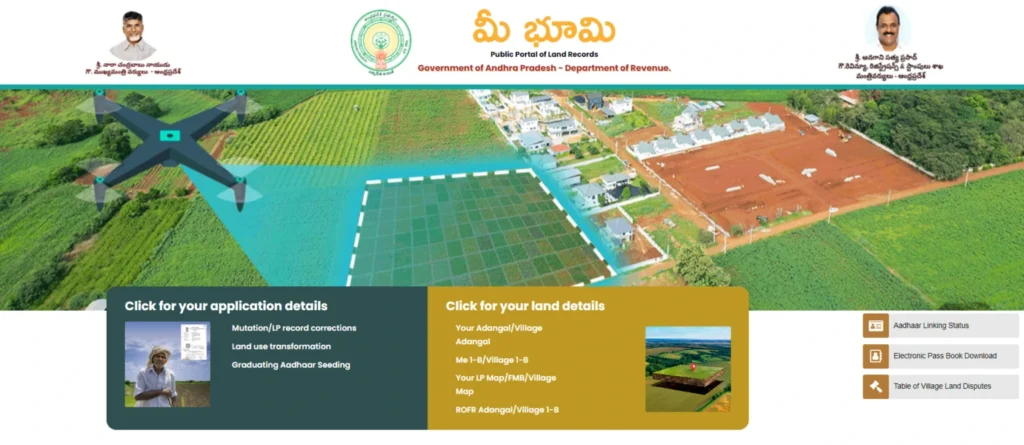
Services Available on MeeBhoomi Portal
| Service | Description |
|---|---|
| Adangal / Village Adangal | View cultivation, land type, and crop details. |
| 1B / Village 1B | Check ownership and historical land records. |
| Village Map (LP Map / FMB) | View detailed survey boundaries and field maps. |
| E-Passbook | Download the official land ownership record. |
| Mutation Status | Check pending or completed ownership changes. |
| Aadhaar Linking Status | Verify if your Aadhaar is connected to land records. |
| Village Land Disputes | View active or settled land dispute cases. |
How to Check Land Records on MeeBhoomi
Follow these easy steps to access your land records online:
1. Check Adangal / Village Adangal (అడంగల్ / గ్రామ అడంగల్)
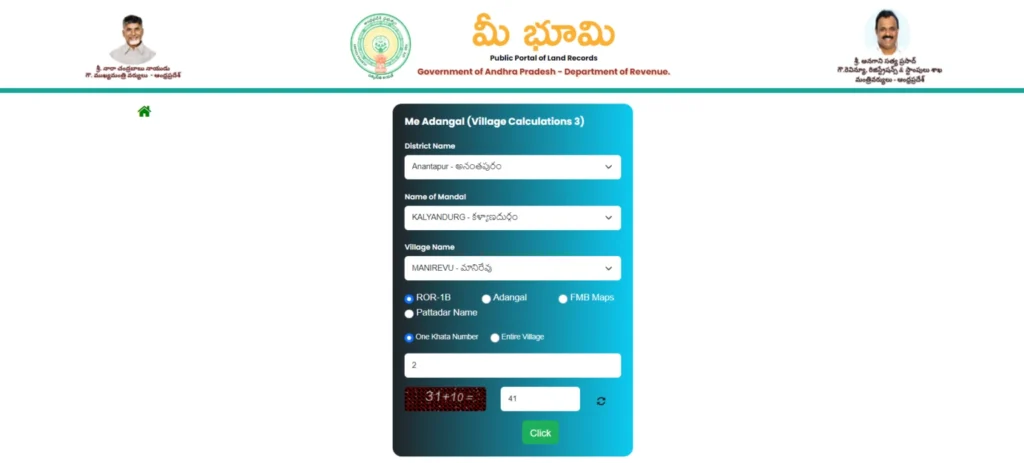
To view your Adangal records:
- Visit meebhoomi.ap.gov.in
- Click on “మీ భూమి వివరాల కోసం క్లిక్ చేయండి”
- Select “మీ అడంగల్/గ్రామ అడంగల్”
- Choose District → Mandal → Village
- Enter your Khata Number or select “Entire Village”
- Complete the Captcha and click “Submit”
- Your Adangal report will appear showing crop details, soil type, and owner name. You can print or download it as a PDF.
2. Check 1B / Village 1B (1-బి / గ్రామ 1-బి)
- Go to MeeBhoomi homepage → “మీ భూమి వివరాల కోసం క్లిక్ చేయండి”
- Choose “1B/Village 1B”
- Select District → Mandal → Village
- Enter Khata Number or select “Entire Village”
- Solve Captcha and submit
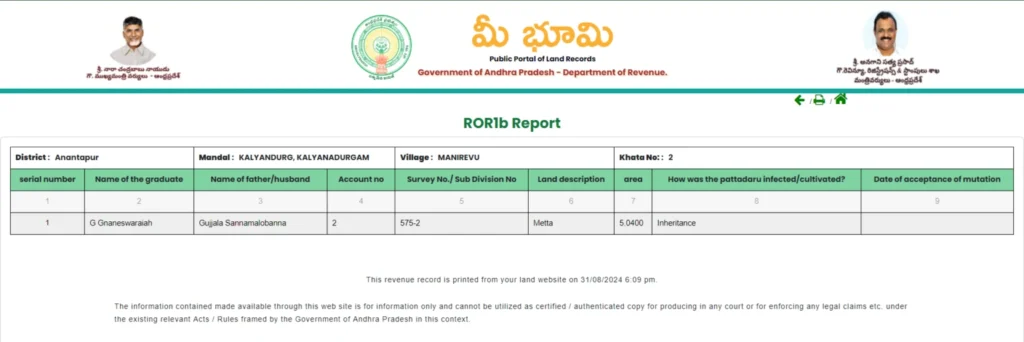
You’ll see your 1B (Record of Rights) report containing owner name, survey number, extent, and land classification.
3. Download Village Map / LP Map / FMB (గ్రామ పటం)
For the Village Map:
- Select “మీ L.P Map/FMB/గ్రామ పటం” on the homepage
- Choose District → Mandal → Village
- Enter Captcha and click “Submit”
- You’ll get the village map showing land divisions and field measurements (FMB). This helps identify land location and boundaries.
4. Download Electronic Passbook (E-Passbook)
To download the E-Passbook:
- Click “Electronic Passbook Download”
- Select District, Mandal, Village
- Enter your Account Number
- Submit the OTP received on your mobile
- Your E-Passbook will download instantly, showing verified ownership details from the Revenue Department.
5. Check Aadhaar Linking Status
To check if your Aadhaar is linked:
- Go to “Aadhaar Linking Status”
- Enter Aadhaar Number or Account Number
- Submit the Captcha
- You’ll know whether your Aadhaar is linked to your land record.
6. Check Village Land Dispute Table (గ్రామ భూ వివాదముల పట్టిక)
To check for land disputes in your village:
- Click on the “Village Land Dispute” option
- Select District, Mandal, Village
- Enter your Survey Number and Captcha
- The system will show any dispute cases, status, and court details related to your survey number.
MeeBhoomi Mutation Process (Ownership Transfer)
Mutation means transferring land ownership when a sale, inheritance, or gift occurs.
Steps to Check Mutation Status:
- Visit MeeBhoomi Mutation Status page
- Enter District, Mandal, Village
- Input your Survey Number / Account Number
- Submit Captcha → View your application status.
Types of Mutation Requests:
- Sale / Purchase of land
- Legal heir transfer (after owner’s death)
- Partition within family
- Gift or court order update
Note: If mutation is pending, visit your MRO (Mandal Revenue Office) with supporting documents like Registered Sale Deed, Encumbrance Certificate, Death Certificate, etc.
MeeBhoomi Passbook & Correction Process
If your E-Passbook or Adangal/1B contains incorrect information (like name spelling, survey mismatch, or Aadhaar error), follow these steps:
- Visit your nearest MRO office
- Carry your Registered Sale Deed, Aadhaar, and Old Passbook
- Submit a Correction Request Form (MeeBhoomi Correction)
- Verification will be done by the Revenue Inspector
- Updated details will reflect on MeeBhoomi Portal within a few days
Common MeeBhoomi Issues & Solutions
| Problem | Possible Cause | Solution |
|---|---|---|
| Data Not Found | Incorrect Survey or Khata number | Recheck and enter correct district/mandal details |
| OTP Not Received | Mobile not linked | Update mobile at MRO office |
| Name Mismatch in E-Passbook | Typo in record | Submit correction request |
| Aadhaar Not Linked | Database not synced | Link Aadhaar manually via MRO office |
| Map Not Loading | Server issue | Try again during off-peak hours or use Chrome browser |
Troubleshooting Meebhoomi Issues
If you encounter problems while using Meebhoomi:
- Verify Details: Ensure all input information is correct.
- Browser Compatibility: Use an updated browser like Chrome or Firefox.
- Clear Cache: Remove browser cache and cookies.
- Contact Support: Reach out to your local MRO (Mandal Revenue Officer) or helpline.
Benefits of MeeBhoomi
- 24/7 Access: Land records are available online anytime.
- Transparency: Always up-to-date and accurate information.
- No Middlemen: Direct access to official government data.
- Mobile-Friendly: Access records seamlessly on smartphones and tablets.
- Security: Aadhaar-based verification ensures safe and authorized access.
- Simple Interface: Designed for easy navigation, even for those with limited tech knowledge.
Tamil Nadu Land Records: A Comparative Look
Similar to the MeeBhoomi portal in Andhra Pradesh, Tamil Nadu has its own land record system:
- Patta Chitta: Check ownership and FMB maps for Tamil Nadu.
- eServices Portal: Access Tamil Nadu’s land records online through eservices.tn.gov.in.
Just like MeeBhoomi, Tamil Nadu residents can benefit from easy online access to land records.
MeeBhoomi Mobile App
The MeeBhoomi Mobile App is available on the Google Play Store and lets users:
- View 1B, Adangal, and Maps
- Download E-Passbook
- Track Mutation and Aadhaar status
- Share records easily via WhatsApp or Email
Tip: Always verify that you’re using the official app by the Andhra Pradesh Government (Publisher: MeeBhoomi / CCLA).
Conclusion
The MeeBhoomi Andhra Pradesh Portal (మీ భూమి) has revolutionized how citizens access land records. Farmers and landowners can now view, verify, and download their land details from the comfort of their homes.
MeeBhoomi – మీ భూమి, మీ హక్కు (Your Land, Your Right)
Visit https://meebhoomi.ap.gov.in today to explore your official AP land records online.